This forum may contain content not suitable for minors. By clicking "Enter", you confirm that you are 18 years of age or older and agree to proceed at your own discretion. Be sure to Read the Terms and Rules before participating.
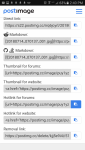
Go to postimg (note the "Rockville" ad will be a different ad for you)
Select "Choose images"
Find the photo on your device you want to post.
Scroll to "Hotlink for forums" and click the icon to the right of it. This copies the link.
Go the message you want to post the image in here on the forum.
Long press and select Paste.
Post your thread.
That's it!
Just one of many, many ways to post a pic.
These instructions are for an android, but will be similar across all devices.
Folks, feel free to post a tutorial or instructions on how to post pics using your favorite image hosting service!
We'll make them "sticky" so those less tech savvy don't think it's some sort of conspiracy!
Hopefully they don’t get greedy like photobucket did. Another forum that I am the admin on we lost a lot of photos. Of course we lost a bunch locally when we did a major upgrade in Xenfero.
The most recent update we didn’t lose pics until photobucket got greedy and blocked third party site access. Me and my staff have been working on trying to find them and reload the photos.


This site uses cookies to help personalise content, tailor your experience and to keep you logged in if you register.
By continuing to use this site, you are consenting to our use of cookies.