18+ Content Warning

This forum may contain content not suitable for minors.
By clicking "Enter", you confirm that you are
18 years of age or older
and agree to proceed at your own discretion.
Be sure to Read the Terms and Rules before participating.

  • A limited run of Nevada Shooters hats are now available!
    CLICK HERE for details!

How to add a picture to your post with Imgur

titanNV

NRA Endowment Member
Staff member
Administrator
Forum Supporter
2019 Supporter
2020 Supporter
2021 Supporter
2022 Supporter
2023 Supporter
2024 Supporter
2025 Supporter
2026 Supporter
Trading Post Subscriber
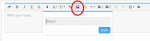
Enter the address of your photo here:
1532879563555.png
Then press the Insert button.
 
I use Imgur.com. They have a decent phone app for uploading too. Below is the interface on your web browser. Once you upload from your phone, go to the website and select the image you want to post. Then hit the copy button on the circled option. You can then copy this code into the body of your post wherever you want to the image to appear. For example, this is the code for the image below.


Code:
[img]https://i.imgur.com/WVNJVA6.jpg[/img]

WVNJVA6.jpg
 
Hopefully this helps a few people out.

Cheers.
 
Awesome
I was going to check out how to use imgur but it prompted me to sign up for an account. Is it necessary to have an account?
 
Awesome
I was going to check out how to use imgur but it prompted me to sign up for an account. Is it necessary to have an account?

It is but you can use Google or Facebook to sign up so it cuts down on one more login. I switched to Imgur after photobucket did their thing. PB worked the same way, as do others I'm guessing.
 

Back
Top